30 December 2013

Website Design Strategy to Increase Conversion Rate

By Vasim 156 Comments

Conversion rate is one of the barometers of your site's success.  Together with other forms of statistical information, the conversion process signifies the actual number of visitors who did not only visit your web site but who completed the desired actions such as an order. Hence, the higher the conversion rate, the greater income for you.
A nicely built web site appeals to visitors and fosters interest to remain at your website. Style and design is the appearance that creates impact whenever a customer arrived at your site, so it is vital to create a user friendly web site. There are plenty of ways to enhance conversions but in this article i will give attention to web site design to increase your conversion rate.

•    Simplicity and User Friendliness   

The prettiest layout can be completely worthless if a person gets lost and closes the page as a result of confusion. Your goal should be to build a site that is very easy to navigate so your visitors may finish only a few simple steps before the purchase. The ease-of-use of your web design has to be taken into account by the web designer when building a web site. The more user-friendly the site design is the simpler it is to navigate, and the easier the user can interact with it.  Do not forget that a user is like a driver and your site is like a map. Have the map uncomplicated so he is able to arrive at the destination quickly.

•    Corporate Colour Scheme

The developer must retain the corporate colour of the company since the website represents the company. Picking simple but attractive colour scheme is preferable than using way too many colours.

•    Visibility of Links and Buttons

To begin with, make certain that all crucial links and site buttons are noticeable. don't fear creating big and vibrant buttons: the truth is the consumers desires to see them and they value this option. Think also of the most appropriate text.  The phrase “buy” will work more efficiently than merely the word “add”. Some people dislike scrolling down the page. This suggests that it's better to squeeze the navigation keys within their reach.
In fact, the shorter time an individual eats up on navigation he can spend even more time on the actual buying. Therefore your task is to make your site as easy as possible. Simply put, make your site guest feel at home! Creativity is a plus, however in order to increase conversions, typical web page designs are definitely worth trying. The purchasers will depend on previous browsing encounter although he may happen to stumble at your site unintentionally.

•    Call to Action Button

The main objective of your sites’ content and design is to teach your users. After becoming aware of your products and services, the consumer may opt to contact you. To obtain leads, a web owner should have to specify a very convenient space intended for call to action within a page. The call to action buttons need to mirror the users' anticipations.
When your guests complete the orders form, they may be going through a hard task of finishing it. Your main goal is to optimize your website to ensure that they can easily complete all the necessary steps. Verify if the questions are understandable and clear. It's advised to emphasize the in-line errors so that the purchasers will immediately notice what they need to correct.
With such simple ideas above on improving conversions through website design, you will make more money and create a lucrative online business.  This proves the value of website design to increase your conversion rate.

Author Bio

The AUTHOR is an experienced blogger and SEO specialist. He loves to write and share his experiences on blogging and Search Engine Optimization. He is also a contributing writer to www.essayjedi.com.
Read More

26 December 2013

How to make Laptop as a WiFi Hub for 2G Smartphones

By Vasim 8 Comments
Now a days every person uses a smartphone and every smartphone has facility of WiFi. Some smartphones having only 2G data connection so who using that handset having problem of slow internet connection. So here is the solution of that problem. Requirement is Laptop and Broadband/3G Internet Conection.

Steps


1. Download Virtual Router Plus software from Here.

2. Install Virtual Router Plus on your laptop.

3. Now Set Network Name(SSID) and Password.

4. Start your Broadband/3G internet connection.

5. Select your connection under the list "Shared Connection"

6. Click on Start Virtual Router Plus.

7. Done...!! Now start your WiFi on your phone and serarch for your network. Then type password and click on connect. And now enjoy fast internet speed on your 2G enabled smartphone. 

Want to know "How to password protect your USB Drive without any Software" Click Here.

Read More

23 December 2013

HTC Desire 400 Android SmartPhone Unveiled

By Vasim 4 Comments
 
HTC has stretched its Desire extend with the presentation of another mid-range cell phone, the Desire 400 Dual Sim. The Taiwanese handset creator quietly recorded the Desire 400 double Sim on HTC's Russian and Ukrainian destinations.

Features & Specifications


Display : 4.30-inch of WVGA Screen
OS : Android
Processor : 1.2GHz
RAM : 1GB
Storage : 4GB (Internal)
Expandable Upto 32GB
Resolution : 480x800 pixels
Rear Camera : 8-megapixel
Front Camera : 1.6-megapixel
Battery capacity : 1800mAh

Want to See the Features, Specifications and Review of "HTC One Max FULL HD Smartphone" Click Here
Read More

14 December 2013

Cool Hidden Features In Android KitKat 4.4 And How To Access Them

By Vasim

The latest Android by Google, KitKat 4.4, which was released recently, brings new great features into the world of technology. There are many new improved specifications, such as better power efficiency, better voice recognition, Google-infused home screen and others. But this is far not all KitKat 4.4 includes. There are new hidden features which fortunately have been already explored and discussed by enthusiasts. Here are some of the best hidden features the latest Android includes and tips on how to access them.

Google Now

One of the new features is the Google Now service. This app will give you any information about basically anything that is happening and you might be interested in, from the weather forecast and the score of your favourite team to anything you can think of. It can be easily accessed by swiping to the right of the home screen.

Ok Google

Ok Google is a voice recognition app which gives you the chance to activate Google by simply saying a keyword. To do that, you just have to switch to 'Always an option'. The app is based on American English, so in case you are from a non-US place, you should change the settings and get Ok Google working by changing the language from 'Language and input', then 'Voice search' and 'Set language'.

Hangouts App

This is an app that provides with the opportunity to communicate using photos and videos, sharing locations and also having live conversations for free. Its only disadvantage is the fact it doesn't support invisible mode.

Home Screen

There are three default screens and if you want to change yours and include a new one, you have to slide icons away. Drag the icon you've chosen to the right edge of your mobile device and there you'll see a new screen. You can put as many as you want. After you create a new home screen, rearrange its position by using the black space.

Immersive Mode

There are soft keys which appear on the screen all the time, which can be very disturbing when trying to read or watch something. Use the Immersive Mode to hide the keys.

Wireless Print

Android KitKat 4.4 allows you to print almost any type of content using Wi-Fi or a cloud service, such as Google Cloud Print. You can print nearly every type of document, file or image.

Lock Screen Album Art

KitKat 4.4 not only allows full-screen albums of your favourite music to appear on a locked screen, but also provides you with controls to change and pause.

GPS Battery Saver

There are new battery saving tools which decrease the energy needed by the GPS app to find a certain location. To enable it, follow these simple steps: Settings – Location – Mode – Enable Battery Saving.

QuickOffice

Using this app, you can create and edit documents and presentations on your mobile device and save it to the Google Drive cloud storage. You get 15 GB of free space and you can easily enter your files from any device.

There are some great new features of Android KitKat 4.4 that are hidden but can be easily accessed. Check out our list and see how you can do it without a problem.

Author Bio: 

Rose Finchley loves to write for technologies and gadgets. She works as a technician for http://www.hirehousecleaner.co.uk/ and loves to write for her readers.
Read More

6 December 2013

Finding Customers/ Clients for Your Blog

By Vasim
 
Customers need to realize that they're being dealt with by the best in the industry. Assuming that they're attempting to pick between one consultant who they never became aware of, and one who's composed on a few prevalent web journals and has a distributed book, who do you suppose seems, by all accounts, to be a greater amount of a master?

You don't need to compose a book, yet sites are a phenomenal approach to get your name known. Most locales will even pay you to compose articles, which winds up being an extraordinary approach to acquire some additional salary. Most social sites have encourages you can subscribe to and they might be super helpful to utilize them for finding new customers. Case in point, assuming that you head off to Twitter and hunt down "looking consultant," what posts appear? What different expressions would you be able to use to find customers?

You'll see aRss catch for every pursuit you do on Twitter, so it’s great to subscribe to these so you can stay informed concerning potential customer posts. In like manner, very nearly all employment sheets likewise have bolsters. It will spare you profitable opportunity to subscribe to them, so you never miss a great presenting or have on recollect staying aware of every site each day. When you don't have anything to do throughout the day, it might be enticing to look at offering destinations like elance, Master or Consultant. That is to say, there are a huge amount of customers making a request for work in that spot, correct? 

In all actuality, offering destinations might be a great deal of inconvenience for consultants, along these lines ought to be approached with alert. The hours you use experiencing the site, making offers, and the low (once in a while criminal) pay you regularly gain is infrequently worth the trouble. You're typically much better off investing that time.

Author Bio: 

The Article is written by Mr.Suhel S Sayyad. Visit his technology blog www.suhelsayyad.com.
Read More

3 December 2013

Dhoom:3 The Game - Review and Features

By Vasim 5 Comments

Review:

For all the fans of Dhoom, here is the first in the series, action packed, thriller Dhoom:3 The Game. Dhoom:3 movie anti-hero and zoom through the streets of Chicago on your Super Bike as you evade ACP Jai Dixit, Ali and the Cops. With simple Tilt and Tap controls, enjoy hours of fun filled action in this 3D endless racing game.

Its very interesting game to play on your android phone. You feel good while playing the game.The Cops are out in full force & there's just one way out! Ride hard and fast through the streets on your Super Bike battling heavy traffic, cops, pursuit helicopters and more! Use the Nitro power-up to reach extreme speeds and leave everybody in your trail! Trouble ahead? Blow away everything in your path with the Sonic Pulse & keep the Chase up!

FEATURES:

*State-of-the-Art Graphics for an awesome gameplay experience on Android Smartphones and Tablets!

*Responsive Accelerometer and Tap Controls to steer you to victory!

*Collect Coins In-Game and use them to buy cool bikes, racing suits and Power-Ups!

*Hit extreme speed with Nitro boosts, clear your way with powerful Sonic blasts and become invincible with Shields.

*Race up the Leaderboards and show everyone you are the master of your destiny!

Additional information:

Last Updated : 24 November 2013

Size : 29MB

Current Version: 1.0.2

Requires Android :2.2 and up

Screenshots:


Read More

29 November 2013

Schedule Content With WordPress Plugins

By Vasim 3 Comments

Many people think that it's rather easy to be a blogger. Many people are wrong. I'm not going to delve into the problem of how hard it is to make it through all the steep competition and how many people actually try and fail. You need to be familiar with the grounds of the blogging community, you need to know what in the world you're doing and you need to produce top-notch content on a regular basis. But I'm not here to talk about how tough being a blogger is. I'm here to describe the wonder of scheduling content plugins and the way they make the whole process much easier. When you're a blogger, it's sometimes difficult to keep the content up. Some days you just don't feel well, or don't feel like writing at all. Other days you're just too busy to upload the content in your blog. Even if you're accepting guests posts, it can still be difficult. Worst of all, some days you have the time and energy to write a lot and come up with lots of content, but by the end you're too tired upload it. Whatever the case, scheduling your content is the perfect way to deal with the situation.

Before you start flaming, I know that WP has a native scheduling system, but that thing has been due to an update for ages. It's slow, clunky and has limited options. Instead of using it, you can always download some additional plugins and make your life a bit easier. And when I say a bit, I actually mean a lot.

Time Release

Let's face it, we all get lazy sometimes. It's in our nature, we can't help it. Especially when you're running a blog for a living, it's easy to get carried away and do anything for a few days. This is bad, though, because you can lose readers and ad revenue rather quickly. If you don't want that happening, there is an easy solution – write a few extra posts when you have some time in excess, then queue them up in Time Release and the plugin will publish them one by one, in order of queue if you haven't posted anything for a given number of days.

You have to save your posts as drafts when you're queuing them, though, because Time Release is quite particular about that. The “pill” icon for showing you which posts have been queued is an interesting choice. Overall, it's a great plugin but you really need to be careful.

Automatic Post Scheduler

Automatic Post Scheduler is even better because it basically creates an automated editorial plan of the times you will publish your posts. You see, instead of publishing a post right away and letting you post two posts in a row, it automatically schedules the second post's publishing. Then, if the interval is too small and the plugin schedules the publishing of the second post sometime in the future, if you really want to publish it right away, you can do so because you can easily override the plugin. It's a neat tool because of its level of automation. It's easy to use and saves you a lot of work. Generally takes a lot of the work you should do manually and automatizes it.
If you prefer having more direct control of your content, then Time Release would be a better option for you. If you're looking for a plugin to take as much work from your hands as possible, then Automatic Post Scheduler is just for you. It all depends on your preferences. 

Author Bio:

Rose Finchley manages the site of http://www.bestcleanerslondon.co.uk/carpet-cleaning-putney/ and that gives her the knowledge and experience which she would like to share with the others.

Read More

24 November 2013

LG Flex: Features and Review

By Vasim

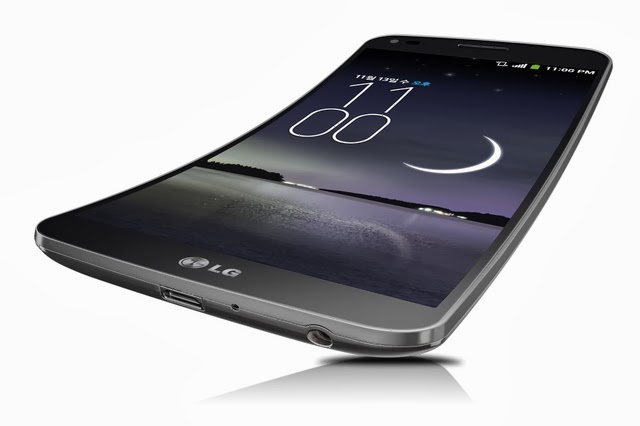
This is a phone that is literally flexible. Instead of being rigid and built with glass and hard plastic, it is made of up flexible components. This means that it may literally be bent and even compressed. It is possible to stand on this phone and not break it (be careful in testing that theory).

It is a very thin phone that is flexible but still rigid. The images of it bending over online are a bit of an exaggeration. It is very light and very thin and it built with plastic substrates that are flexible. In other words, it is curved and rigid, but flexible (it’s hard to describe without having a play with it yourself). You cannot bend the camera, battery or the processors, so look upon it as a phone that is simply more durable (or less fragile) than other phones. And, a phone that has a bit of a curve to it.

The battery is placed within the curving flex phone by the use of stack and folding technology. It reduces the stress that is put on the battery when some fool tries to bend it or tries to stomp on it. It makes it harder to destroy the battery with bending forces.

Features and Review


The LG Flex has the Android 4.2.2 operating system for its UX and UI. Its dimensions are 6.32 inches x 3.21 inches x 0.31 inches, which is 160.5 x 81.6 x 7.9 in mm. It weighs 6.24 oz which is 177g which is against the average of 4.5 oz which is 129 g.

Display

It has a 6 inch screen with a resolution of 720 x 1280 pixels. The pixel density is 245 ppi which is pretty standard (not too good or too bad). It uses P-OLED and has a multi-touch feature to it.

The LG Flex Sensor

It comes with a proximity sensor and a light sensor. It has a battery that is 3500 mAh, which is a massive battery for a phone. It is far bigger than most which is going to guarantee you a nice long standby time and a very good talk time.

Battery

The battery is one of the most inflexible things on a phone. You can create bendy and squashable components for many types of phone innards. But, the battery is where they have really done well to make sure it does not split or burst when compressed or bent.

Sound

It has notifications such as haptic feedback and it has musical MP3 ringtones and well as polyphonic ringtones. It has a vibration mode, flight mode and silent mode as well as speakerphone. It comes with sensor such as a digital compass and an accelerometer. You can use voice recording, you and use voice dialing and voice commands on your phone too.

The Processor and RAM

It uses the Qualcomm Snapdragon 800 MSM8974 processor. The processor is a quote core which means it has four processors. They run at a pretty good pace of 2260 MHz. It is a Krait 400 processor, and its graphics processor (GPU) is the Adreno 330.

The RAM on the phone is over two GB, which is very good. It is 2048 MB RAM, so along with the processor it is going to be tough to overstretch the systems on this phone. It is going to be able to handle most of the tasks that you throw at it. It also comes with a massive 32 GB of storage, which is very good for a phone, and is more than most people are ever going to need on their phone.

Camera

The LG Flex camera is a 13 mega pixel camera. This is very impressive and 13 mega pixels is currently the biggest mega pixel that phones have. Samsung were the first to install one on a popular mainstream phone, and it is now the highest mega pixel you are going to find on modern mainstream phones.

It is able to take videos and has a Flash LED for your images too. It has a front facing camera so that you can take photos of yourself or so that you can conduct video chats with other people.

Network and communications

It uses GSM: 900, 850, 1900, 1800 MHz and has LTE and HSPA compatibility, as well as EDGE and GPRS compatibility. It uses GPS and A-GPS and has navigation software. It can use Bluetooth 4.0 and has Wi-Fi: 802.11 a, b, g, n, ac. It also has USB 3.0 and microUSB. It also has a mass storage device and USB charging.

Author Bio

Kate Funk is a freelance writer at www.aussiewriter.com. She is mainly focusing on technology, gadgets and all the latest trends which are interesting for networking enthusiasts.
Read More

23 November 2013

Poll Results: Which is the best Smartphone to buy at present?

By Vasim

This blog had run a poll which got recently closed. Poll was based on the best Smartphone to buy at present. Peoples, Mobile lovers were asked to choose the best Smartphone and we have come up with following results for the polling.

Poll Results: The best Smartphone to buy at present

Samsung Galaxy S-IV

Samsung Galaxy S-IV is very good smartphone recently in the market. The features and specifications are very good compare to other smartphones. Samsung have maintained their position in the android phone market.

Poll Result: 56%

iPhone 5

iPhone 5 gets second position in the poll which has been taken at this blog. iPhone 5 has its own value in the market. It also have very good features and specifications and the Operating system is different than the Samsung phones.

Poll Result: 25%

Blackberry Z10

Blackberry Z10 is also a very good smart phone launche by Blackberry. They have maintained their own market in the mobile industry. The features and specifications are good.

Poll Result: 12%

HTC One

HTC One is also a good smartphone present in the market. HTC have good features and specifications. HTC is new brand getting popular recently in the market.

Want to know about HTC One Max Features and Specifications Click Here

Poll Result: 6%

Read More

15 November 2013

E-mail Scanning Tool Gets a New Name - LinkedIn Intro

By Vasim 2 Comments

It is a fact unanimously acknowledged that the growth of mobile e-mail is looming large. 5 years ago, hardly 4-5% of emails were read on mobile but now, it is rather surprising to note that more than half of all emails are read on a mobile device. So we have no other option but to set ourselves at par with the challenge, that of bringing the power of LinkedIn, the technology of Rapportive straightaway to the Apple Mail app on your iPhone. This is what is called LinkedIn Intro. Through LinkedIn Intro, you can see the LinkedIn profiles in the mail app on your iPhone. The business network LinkedIn always had plans to enhance and beautify the emails of the users on iPhones by adding some detailing through a proxy server. This has always been criticized as a security risk but the company has always replied back to such controversies calling them purely speculative.

LinkedIn recently outlined its plans of introducing the new ‘Intro’ service and said that this will help filter emails through a LinkedIn server before sending it to the user. Intro will also have the ability to identify and recognize LinkedIn users and embed their details into the emails through a different interactive box, which will appear at the top of every email. It is undoubtedly true that all those engineers who have invented Intro must be patting themselves but little do they know that this can have some ghastly implications. No, it’s not that the engineers have created Intro with some malicious intentions but security is not a part of the website’s DNA and this is what is troubling the experts. 


LinkedIn Intro - A middleman for emails

The LinkedIn servers require full access to their e-mail accounts and also require connecting directly with the email servers of the user in order to inject the Intro service into the top of the user’s email. The email server will then forward the forwarded mail to the iPhone by using a custom security profile that the users install on their iPhones. On the contrary, the critiques are of the opinion that they don’t see any security-conscious firm letting its employees handle LinkedIn to its emails as it just introduces yet another link within the privacy chain. This could be potentially exploited in the near future.

The LinkedIn security team has offered a reply to these contradictions by saying that these are totally incorrect and are nothing but speculations. They are of the opinion that the entire team was presented with this core design of LinkedIn Intro and they’ve made sure that they built the most secure implementation that was possible for them. According to them, they’ve explored different threat models and have kept challenging each other about the possible threats that they might come across.

The LinkedIn Intro is based on the technology acquired by LinkedIn after its purchase of email company Rapportive in the year 2012 and Rahul Vohra has described this service as all that one can need to add faces to names. Although there are discussions on the security risks, the LinkedIn Intro seems to be too useful on the surface.

Read More